
Screenshots



About this game
With a built-in scanner, value lookup, automatic information detection, checklist tracking, card sorting, flippable cards, beautiful image sharing, infinitely nestable folders, powerful search, iCloud sync support, CSV export, and plentiful customization options, Cardstock is the best way to digitally catalog your sports cards.
Features:
⋅ Scanner - The scanner uses the camera to convert your image into a high quality scan.
⋅ Value lookup - By using the value lookup, you will be able to see what similar cards have sold for on eBay.
⋅ Automatic information detection - Every time a card is scanned, Cardstock searches it and records any useful information found.
⋅ Checklist Tracking - Checklists allow you to utilize your collection to track your progress on completing sets.
- Each time you open a checklist, Cardstock searches for any matching cards and uses them to automatically fill out or create items.
- Checklist templates uploaded by our team or other users make it easy to add checklists.
⋅ Card Sorting - A powerful sort options menu allows you to sort your cards by any number of attributes.
- Cardstock's ability to sort cards into attribute based groups provides you with new ways to view your collection.
⋅ Flippable cards - Cards in your collection can be tapped and flipped to allow viewing of either side.
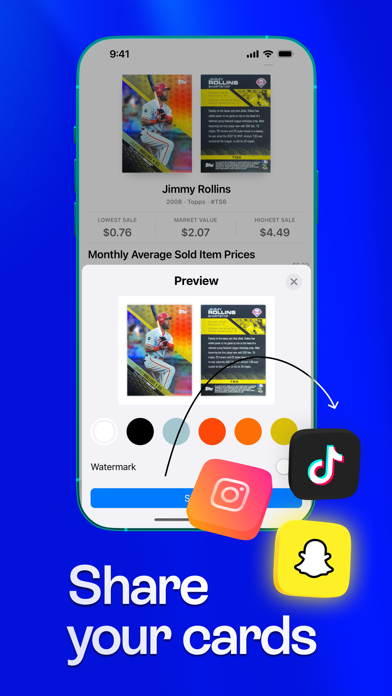
⋅ Beautiful image sharing - Sharing a card creates a stunning image by combining both sides on top of a background chosen from colors generated to match.
⋅ Nestable folders - Folders allow cards to be organized in whatever way is best for you.
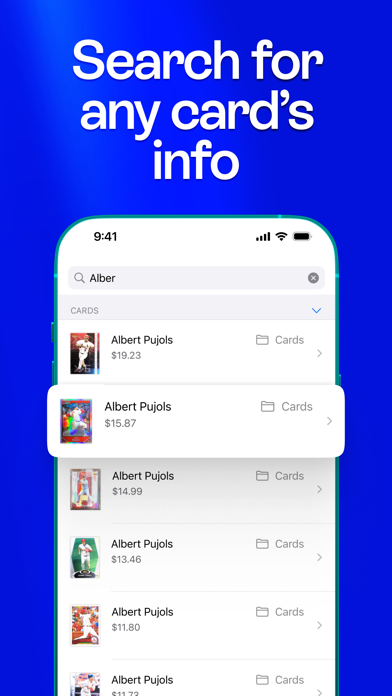
⋅ Powerful search - The search tab allows you to search by any attribute found on a card, checklist, or template.
⋅ iCloud Sync Support - Your collection is automatically kept in sync across devices via iCloud.
⋅ CSV export - Cards can be exported to a CSV file to give you full control of your data.
⋅ Customization - The vast number of settings provided enables you to find what works best for you.
I am an independent app developer and I made this app because I couldn’t find a good app on the App Store to catalog my baseball collection. I have worked really hard to provide an app that is both powerful and aesthetically pleasing. The scanner and automatic information detection make Cardstock the easiest way to digitize your collection, the value lookup is the quickest and most accurate way to estimate the true value of your cards, and the ability to share beautiful images of your cards is unrivaled. If you have any questions, comments, or suggestions, don’t hesitate to email me at kyle.fowler@openbraceapps.com.
---
Cardstock uses auto-renewing subscriptions to unlock Unlimited Access.
Payment will be applied to your iTunes account on confirmation. Subscriptions will automatically renew unless canceled within 24-hours before the end of the current period. You can cancel anytime with your iTunes account settings. For more information, see http://www.openbraceapps.com/CardstockPrivacyPolicy/index.html.
Terms of Use: https://www.apple.com/legal/internet-services/itunes/dev/stdeula/
Related: Casino & Gambling Games, Action Games, Sports Games
Key Features
- Sports Genre: Immersive Sports gameplay experience
- Highly Rated: 4.6-star average from thousands of players
- Free to Play: Download and start playing immediately at no cost
- iOS Compatible: Available on Apple App Store for iPhone and iPad
Pros & Cons
Pros
- ✓ Free to download and play
- ✓ High user ratings (4.6 stars)
- ✓ Regular updates and improvements
- ✓ Engaging Sports gameplay
Cons
- ✗ Requires internet connection for some features
- ✗ May consume battery on extended play sessions
Frequently Asked Questions
Is Cardstock: Sports Card Scanner free to play?
Yes, Cardstock: Sports Card Scanner is completely free to download and play.
What devices can I play Cardstock: Sports Card Scanner on?
Cardstock: Sports Card Scanner is available for @if($game->google_play_id && $game->apple_store_id) and @endif@if($game->apple_store_id)iOS devices (iPhone/iPad) via Apple App Store@endif.
Does Cardstock: Sports Card Scanner require an internet connection?
While some features of Cardstock: Sports Card Scanner can be enjoyed offline, an internet connection is recommended for the full experience, including multiplayer features, updates, and cloud saves.
How do I download Cardstock: Sports Card Scanner?
Simply click the "Download Now" button above to be directed to your device's app store. The game will be installed automatically after you confirm the download.


